





Every day, businesses send important emails to customers, partners, employees, and suppliers. Some contain proposals, while others carry contracts, payment instructions, legal notices, or time-sensitive information. Once an email is sent, people ask a familiar question: Did the recipient actually open it?
Email open tracking plays a role here. It helps senders identify when an email may have been opened and offer useful insights into recipient activity, but the technology has important limitations. An email marked as opened does not necessarily mean someone read or understood its contents. Similarly, an email without an open notification may still have been read.
Understanding how email tracking works, what triggers an open notification, and how those signals differ from delivery confirmation helps businesses make better decisions about their communications.
Email open tracking helps senders monitor whether an email has been opened or displayed by a recipient's email application. It’s commonly used in sales outreach, marketing campaigns, customer communications, and business correspondence.
Depending on the tracking service, senders may receive notifications showing when an email was opened or how many times an opening-related event was recorded. For example, a salesperson might send a proposal to a prospective customer and receive an alert indicating that the email was opened. This information could help determine when to follow up.
However, an open notification is an indication of activity, not definitive proof that a person read the message. Several factors are at play here - email applications, privacy settings, image-loading preferences, automated systems - all influence how opening activity is recorded. That distinction is essential when interpreting email tracking results.
Most conventional email open tracking systems rely on a small, invisible image embedded in an HTML email called an open tracking pixel; sometimes also called a tracking beacon. It generally involves four steps.
This is the basic principle behind many tools designed to track email opens. But a crude limitation of this is that invisible images in email can notify senders about viewing activity, and blocking external images can prevent this form of tracking.
An email with tracking enabled may provide several types of information, depending on the capabilities of the service and the recipient's email application, such as:
Email open tracking can be useful, but its accuracy depends heavily on how the recipient’s email environment handles external content. Several common situations can affect the results.
One of the most important distinctions in email communication is the difference between opening an email and successfully delivering it. Although the terms are sometimes used interchangeably, email open tracking and email delivery tracking measure different events.
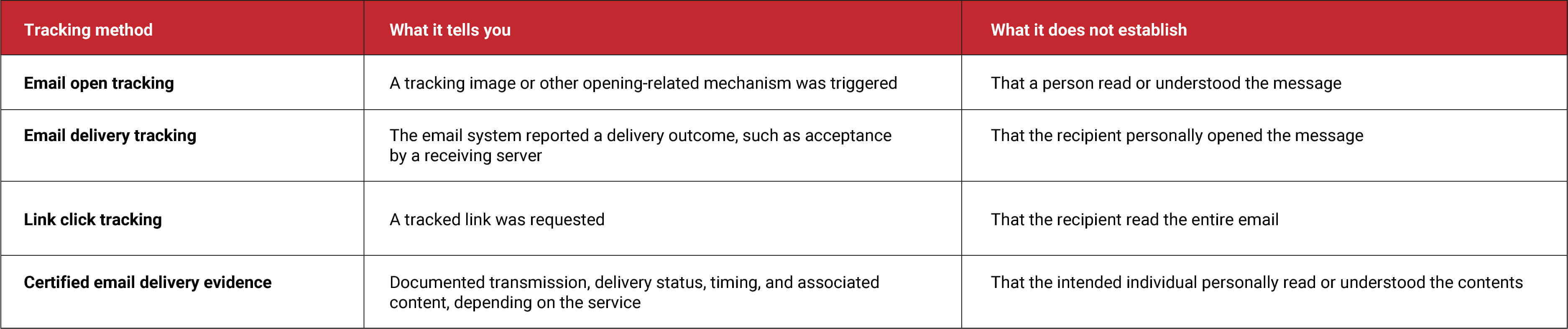
Consider a company emailing an important contract notice. An open notification may suggest activity associated with the message, but it does not establish exactly what content reached the receiving system. For communications involving deadlines, financial obligations, compliance, or potential disputes, this distinction is very important.
Traditional read receipts and pixel-based open tracking use different mechanisms. A read receipt is generally a notification generated by the recipient's email application. The internet standard, RFC 8098, defines Message Disposition Notifications, which can communicate events such as a message being displayed.
Whether a read receipt is generated can depend on the recipient's email application, settings, and organizational policies. The standard itself clarifies that a displayed notification does not guarantee that the content was read or understood.
An open tracking pixel, by comparison, records a remote image request. It generally does not require the recipient to respond to a read receipt request, but it remains subject to image blocking, privacy protections, and automated loading.
Neither method, by itself, establishes that a particular person understood the contents of a message.
For regular communications, an approximate indication of engagement may be sufficient. However, when an email contains information with legal, financial, or regulatory consequences, businesses may need a more reliable record of transmission and delivery.
A good example is RPost’s case study of Loudoun County, Virginia. The County struggled with traditional postal notices and standard email communications, and needed more than an indication that an email had been opened. It wanted delivery status, certified proof, and records that could help resolve disputes over whether notices were received.
The County adopted Registered Email™ service, which provides a Registered Receipt® record documenting delivery status, relevant timestamps, and associated message content. The example illustrates why organizations should distinguish between tracking engagement and retaining verifiable evidence of delivery.
The Registered Email™ technology focuses on creating an auditable record of email transmission and delivery. Rather than relying solely on whether an email was opened, Registered Email provides a Registered Receipt® that documents delivery status, transmission information, timestamps, and associated message and attachment content. These records can be authenticated to support later verification of the communication.
RPost also offers RAPTOR™ AI capabilities designed to analyze interaction metadata associated with messages and documents after delivery. These capabilities focus on identifying potentially unexpected or suspicious content access, including activity across third-party environments.
Such analysis serves a different purpose from conventional open tracking: identifying possible security risks rather than simply measuring recipient engagement. Importantly, neither delivery evidence nor interaction monitoring should be presented as proof that the intended recipient personally read and understood an email. Each capability provides a different type of visibility.
Businesses can gain greater value from email tracking by interpreting the information within its proper limits.
Email open tracking offers useful visibility into potential recipient activity. It can support sales follow-ups, marketing analysis, and everyday business communications. However, an email marked as opened is not necessarily an email that has been read, just as an email without an open notification is not necessarily unread.
Privacy controls, tracking pixels, image proxies, and automated processing all influence the information senders receive. The key is understanding the end goal. If it is to measure engagement, email open tracking may be useful; if it’s to establish whether an important communication was delivered, when it was delivered, and what content was transmitted, a verifiable email delivery record may be more appropriate.
Knowing the difference helps businesses move from assumptions about email activity to better-informed communication decisions.
October 26, 2026

September 25, 2026

September 04, 2026

July 17, 2026

July 01, 2026





 Blog
Blog